Introduction
This guide is intended for users with the Contributor role. biddingThe electronic trading system allows you to take part in auctions customer in electronic form.
The manual describes the actions of the bidder in the system - preparation personal account for participation in tenders, submission of applications and direct participation in ongoing auctions.General work with personal office, use of additional features of an authorized user in order to optimize the work with trading.
Terms and definitions
Electronic trading platform (ETP) - automated information system designed to conduct competitive trading procedures in electronic form.
Operator (ETP) - a legal entity that owns an automated trading platform necessary for its functioning software and hardware and ensuring the conduct of trading on procurement of goods, works and services in electronic form.
Personal account is a special section on the electronic trading platform, which is accessible only to those authorized using a login and password The User, allowing him to receive the services provided by the Operator and information about the progress of their provision.
Open part - functionality of the electronic trading platform, access to which is available to all persons, regardless of registration.
User (ETP) - a person who has completed the registration procedure in in accordance with the ETP Regulations.
Organizer (trading procedure) - ETP user who creates conditions for conducting and publishing information about bidding in electronic form.
Participant (trading procedure) - individual entrepreneur or a legal entity registered on the ETP and participating in the process trade and procurement activities, for example, applying to participate in bidding and making price proposals.
Trading procedure (procedure, bidding) - determination process supplier, in order to conclude an agreement with him to satisfy the organizer's needs for goods, works or services.
Open trading procedure - a procedure in which it can accept participation of any organization registered on the ETP with a role "Participant".
Lot - product item, works or services that constitute the subject of the trading procedure, for which, within the framework of this procedure an application for participation is submitted.The trading procedure may include one or more lots.
Purchase from a single source is a procurement method in which the contract concluded with a specific counterparty without carrying out the stage of selecting a supplier.
Procurement documentation - a set of documents approved customer/organizer, which may contain information about the subject procurement, procedure and conditions for participation in the trading procedure, rules registration and submission of applications for participation, criteria for selecting the winner, information terms of the contract concluded as a result of the trading procedure.
Closed auction is a procurement method in which bids from participants are assessed against a set of competitive criteria.On the appointed date and time of opening envelopes, the organizer opens the price offers of the participants. The winner is selected by the auction organizer based on the proposed price offer and summary assessment of the application for participation according to the bidding criteria.
Application (Proposal) - electronic document submitted A trading participant for the purpose of participating in the trading procedure in accordance with by these Regulations.
Winner (trading procedure) - participant or several participants with whom a contract for the supply of goods can be concluded, provision of work or services in accordance with the conducted trade procedure.
Certification is a procedure whose purpose is to confirm participants' ability to perform certain types of services declared them upon registration.
Auction is a procedure in which participants consistently make their price offers.The winner is the participant who offered the besther price offer.
Request for prices is a procurement method in which participants’ applications are assessed against a set of competitive criteria.The winner is chosen by the auction organizer based on the proposed price offer. The auction organizer is not obliged to conclude an agreement.
Request for Proposals is a procurement method in which bids from participants are assessed against a set of competitive criteria.The winner is chosen by the auction organizer based on the proposed price offer and summary assessment of the application for participation according to the bidding criteria.Organizer bidding is not obliged to enter into a contract.
Competition is a competitive method of procurement, the winner of which is the participant who offered the best terms for the execution of the contract.
Rebidding is a procedure that allows its participants to improve their offer.
Prequalification selection (PQS) is a procedure whose purpose is to form a composition of competitive procurement participants capable of performing certain types of work, providing certain types of services, and supplying certain goods, in accordance with the requirements established in the competitive procurement documentation.
Public offer - a procedure in which the price of a lot changes according to specified intervals changes in the public offering price.The winner is selected by the organizer based on the proposed price offer.
Electronic document - a document in which information is presented in electronic digital form.
Authorization and start working in the system
To work in the system on behalf of his company, the user must go through the authorization procedure.After successful authorization the user automatically moves to the “Personal Account*” page.
The authorization process and work in the user’s personal account (sections "Personal Information" and "My Organization") are described in the Guide user.The guide is available in the "Personal Information" section “Training materials” item in the left side menu:
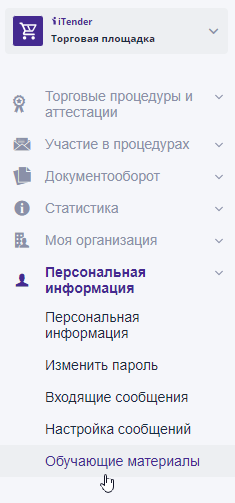
Menu items and access to system sections are formed based on roles assigned to the user within his company.In case need to provide access to additional sections, you should contact a user with the “company employee administrator” role.